
If you dropped your phone in water, protect the entire device before worrying about muffled sound. A wet speaker may recover after drying, but liquid can also affect the charging connector, battery, display, cameras, microphones, and internal electronics.
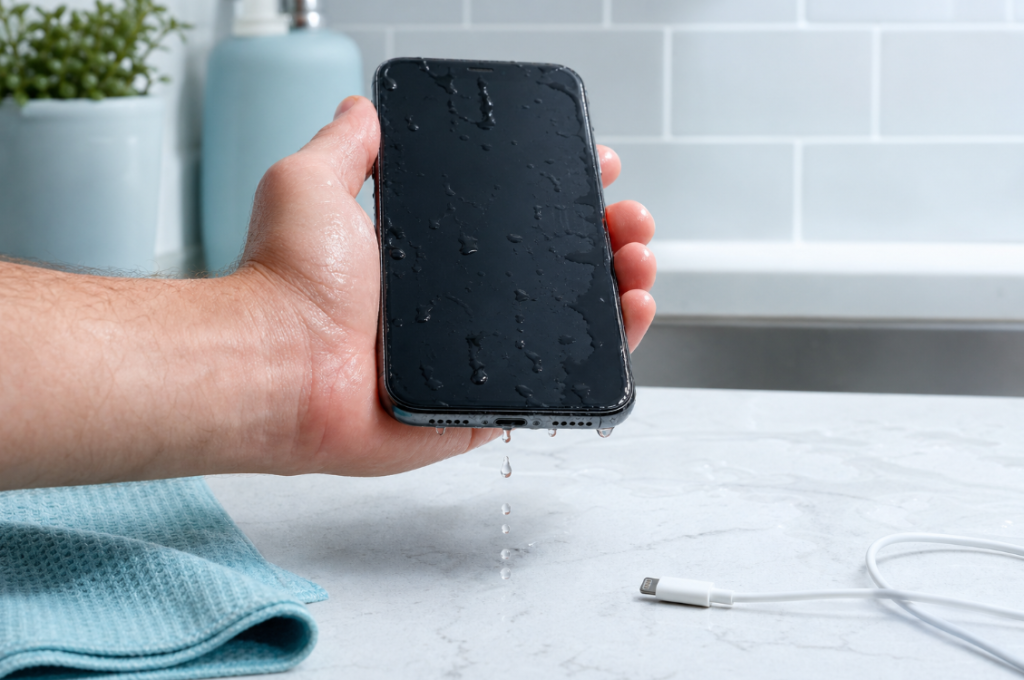
Remove the phone from the liquid, disconnect power, wipe the exterior, and let it dry with airflow at room temperature. Do not charge a wet connector, apply heat, insert objects into openings, or assume that rice will make the phone safe.
The First 60 Seconds
- Remove the phone from the liquid. Do not keep testing it underwater.
- Disconnect every cable and accessory. Do not plug it in to see whether it still charges.
- Remove the case. Water can remain trapped between the case and the phone.
- If it was submerged or behaves abnormally, turn it off. Avoid repeatedly pressing buttons.
- Wipe the outside with a soft, lint-free cloth. Do not push liquid toward an opening.
- Hold ports and the affected speaker downward. Gravity can help surface liquid leave the openings.
- Place the phone in a dry area with airflow at room temperature. Give it time before testing or charging.
Google’s current Pixel guidance says to turn off a phone that fell in water, dry it with a soft cloth, and let it finish drying at room temperature. See Google’s official Pixel water-protection guidance. Instructions differ by model, so use the support page for your exact device whenever possible.
What Not to Do After Water Exposure
Do Not Charge the Phone While the Connector Is Wet
Charging a wet connector can damage contacts and create corrosion. If the phone displays a liquid-detection warning, disconnect the cable and follow the manufacturer’s instructions.
Apple advises tapping an affected iPhone gently with the connector facing downward, then leaving it in a dry area with airflow. Its guidance also says not to use external heat, compressed air, foreign objects, or rice. See Apple’s official liquid-detection instructions.
Do Not Use a Hair Dryer, Heater, or Oven
Heat can damage the battery, display, seals, and adhesives. Warm air may also move moisture deeper rather than removing it safely.
Do Not Insert Cotton Swabs, Paper, or Tools
Material can break off in a port, bend contacts, or push water inward. Let airflow and time work instead of trying to wipe inside a connector.
Do Not Put the Phone in Rice
Rice does not let you inspect internal damage, and small particles can enter ports. A dry, ventilated area is the safer general approach unless the manufacturer gives different device-specific instructions.
Do Not Shake the Phone Violently
Holding an opening downward is different from forcefully shaking the device. Aggressive movement can spread liquid into areas that were previously dry.
How Serious Is the Exposure?
| Exposure | Typical concern | Recommended response |
|---|---|---|
| A few raindrops or a light fresh-water splash | Surface moisture near a grille or port | Wipe, orient openings downward, and allow airflow |
| Brief drop in fresh water | Liquid may have reached several openings | Disconnect power, turn off if practical, dry externally, and follow model-specific guidance |
| Longer submersion | Greater chance of internal exposure | Stop repeated testing and consider qualified inspection |
| Salt water or pool water | Salt or chemicals can leave conductive or corrosive residue | Seek device-specific service promptly |
| Soda, coffee, juice, soap, or another sticky liquid | Residue may remain after water evaporates | Do not rely on a sound or airflow alone; seek qualified cleaning advice |
| Hot phone, fogged cameras, display changes, restarts, swelling, or odor | Possible internal or battery damage | Stop using the phone and arrange professional help |
Water resistance can reduce risk, but it is not a guarantee against every exposure. Seals can age, previous impacts or repairs can affect protection, and manufacturer coverage terms vary.
How Long Should a Wet Phone Dry?
There is no universal drying time for every phone and every incident. A small droplet near a speaker grille is different from liquid inside a connector or under the display.
Follow any liquid warning shown by the device and the manufacturer’s current support page. Do not treat the disappearance of a speaker rattle as proof that the charging port and internal components are dry.
Testing too frequently can slow the process and adds risk if each test involves charging or high-volume playback.
Can a Sound Take Water Out of a Phone?
A low-frequency sound moves the speaker diaphragm. If a small droplet is sitting close to a functioning speaker grille, this movement may help shift it outward. This is the limited situation in which a water-eject sound can be useful.
A sound cannot:
- dry a charging connector;
- pull water out of the battery or circuit board;
- remove salt, sugar, soap, or chemical residue;
- repair corrosion;
- make a submerged phone immediately safe to charge;
- restore a speaker that no longer produces sound.
Only consider a short tone after the outside has been wiped, all cables are disconnected, the phone is stable, and the problem appears limited to muffled speaker audio after a light splash. Open the Water Eject Sound tool at a low volume and hold the affected speaker downward.
For a more complete distinction between surface speaker moisture and internal exposure, read the water in phone speaker guide.
What if the Phone Is an iPhone?
Disconnect the charging cable and follow Apple’s current guidance for the exact model and connector. An online water-eject tone is not the same as an official iPhone repair feature, and iPhone does not provide the same built-in speaker water-ejection control as Apple Watch.
If only the speaker remains muffled after a light splash, use the iPhone speaker water guide for cautious, speaker-specific steps. A liquid alert, submersion, heat, or other abnormal behavior requires a broader response than playing a tone.
What if the Phone Is Android?
Android phones differ widely in grille design, water-resistance rating, diagnostic features, and support instructions. Follow the manufacturer page for the exact model.
The site’s Android water-eject guide explains how a browser sound may be used for minor speaker moisture. It does not replace manufacturer drying guidance or professional inspection after submersion.
Check the Phone Before Returning to Normal Use
After the manufacturer-recommended drying period, inspect and test gradually:
- Look for moisture or residue around ports, camera lenses, seams, and the speaker grille.
- Check whether a liquid warning remains.
- Turn the phone on only if it was powered off and no safety warning is present.
- Test the touchscreen, display, cameras, microphones, speakers, buttons, cellular connection, and Wi-Fi.
- Begin audio playback at a low volume.
- Back up important data if the phone is stable.
- Watch for delayed symptoms over the following days.
Corrosion and residue can cause problems after the phone appears normal. A successful first test does not erase the history of serious exposure.
When to Seek Professional Service
Arrange qualified inspection when:
- the phone was fully submerged;
- the liquid was salty, sugary, soapy, acidic, or otherwise contaminated;
- the phone becomes hot, swells, smells unusual, or restarts;
- the display flickers, cameras fog, or touch input fails;
- charging remains unavailable after the recommended drying time;
- no sound comes from any speaker;
- important data has not been backed up;
- the device was previously cracked, opened, or repaired.
Do not open a wet phone unless you have the correct technical documentation, battery-safety training, and repair environment. Internal batteries can remain hazardous even when a device will not turn on.
Frequently Asked Questions
My phone fell in water but still works. Is it safe?
Continued operation is encouraging but does not prove the connector and internal components are dry. Disconnect power, dry the exterior, follow manufacturer guidance, and monitor for delayed symptoms.
Should I turn off a phone after dropping it in water?
For submersion or abnormal behavior, powering it off is a sensible protective step and is part of Google’s Pixel guidance. Avoid repeated button presses, and follow the exact instructions for your model.
Can vibrations get water out of a phone?
Speaker movement may shift a small droplet near the speaker grille. The phone’s separate vibration motor is less directly focused on that opening. Neither method dries internal electronics. Read the explanation of sound and vibration for phone water.
Is muffled audio permanent after water exposure?
Not always. A small amount of surface moisture may evaporate and sound may improve. Persistent distortion, total silence, or problems after contaminated liquid can indicate residue or damage that needs service.
When can I charge the phone again?
Wait until the connector is dry, any liquid warning has cleared, and the manufacturer’s conditions are met. Do not use a sound to justify charging sooner.