
Water in a phone speaker can make calls, videos, and alerts sound muffled. In a minor splash, the problem may be a droplet sitting close to the speaker grille. After submersion or exposure to another liquid, however, the risk can extend beyond the speaker to the charging port, battery, display, cameras, and internal electronics.
The safest approach is to protect the whole phone first. A water-eject sound can be an optional step for surface moisture, but it is not a complete moisture-removal method and cannot reverse water damage.
Quick Answer: Do This First
- Remove the phone from the liquid.
- Disconnect the charging cable, headphones, and other accessories.
- Remove the case.
- If the phone was submerged or is behaving abnormally, turn it off.
- Wipe the outside with a soft, lint-free cloth.
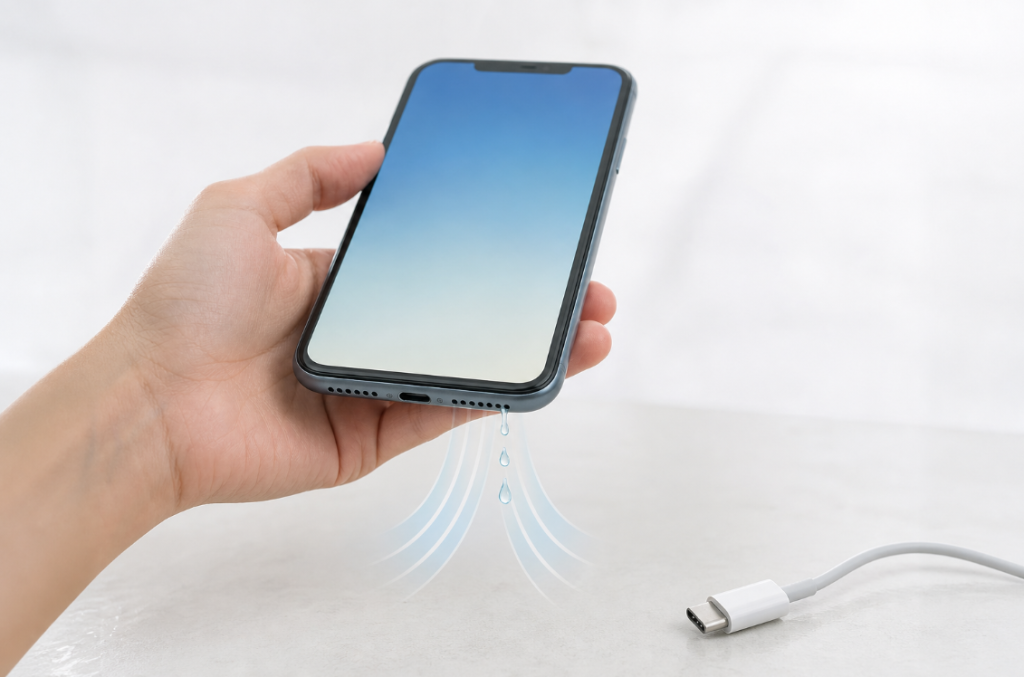
- Hold the charging port and affected speaker downward so gravity can help.
- Leave the phone in a dry place with airflow at room temperature.
- Do not charge it until the connector is dry and any liquid warning has cleared.
Google’s current Pixel guidance recommends turning off a phone that fell in water, drying it with a soft cloth, and leaving it on a flat surface to finish drying at room temperature. Apple recommends a soft lint-free cloth, gentle tapping with the connector downward, and airflow. Manufacturer instructions can differ, so check the support page for your exact model.
How Serious Was the Water Exposure?
| Situation | Risk level | Recommended response |
|---|---|---|
| A few raindrops or a light splash near the speaker | Lower, but not zero | Wipe, position speaker downward, allow airflow, then consider a short tone |
| Phone briefly dropped in fresh water | Higher | Disconnect power, turn it off if practical, dry externally, and follow manufacturer guidance |
| Salt water, pool water, soda, coffee, soap, or another liquid | High | Stop DIY sound cycles and seek device-specific support because residue can remain after water evaporates |
| Liquid warning in the charging port | High | Disconnect the cable and wait for the port to dry; do not use sound as a port-cleaning method |
| Heat, restarts, display changes, fogged camera, or no power | High | Stop using the phone and seek qualified service |
Can a Sound Get Water Out of a Phone Speaker?
A speaker produces sound by moving a thin diaphragm. Low-frequency playback can create visible movement and may shift small droplets near the grille. That is why a remove-water-from-speaker sound sometimes appears to improve muffled audio after a light splash.
The limitation is location. Sound from the speaker cannot reliably remove liquid from the charging port, battery area, camera module, screen, or circuit board. It also cannot remove minerals or sticky residue left by salt water, pool water, or a drink.
There is no single frequency guaranteed to work for every phone. Speaker size, enclosure design, grille shape, case position, and the amount of moisture all affect the result.
How to Try a Water-Eject Sound Carefully
Only try this after completing the basic safety steps above and only when the phone is operating normally.
- Open the Water Eject tool on the affected phone.
- Keep all charging cables disconnected.
- Hold the wet speaker facing downward over a dry cloth.
- Start with the volume low.
- Play one short cycle.
- Stop and test spoken audio at a low volume.
- Give the phone time to dry before deciding whether another attempt is appropriate.
Do not press the speaker against the cloth, because the fabric can block the opening. Do not use maximum volume or run long repeated cycles. Stop if you hear severe distortion, crackling, or an unusual mechanical sound.
What Not to Do After Water Exposure
Do not charge a wet phone
Moisture in a Lightning or USB-C connector can cause corrosion or damage. Wait for the connector to dry and follow any on-screen liquid warning.
Do not use a hair dryer or heater
External heat can damage adhesives, seals, the battery, or the display. Dry the phone at room temperature.
Do not use compressed air
High-pressure air can move moisture or debris deeper into openings.
Do not insert paper, cotton swabs, or tools
Objects can damage connector pins, leave fibers, or push residue deeper.
Do not put the phone in rice
Rice does not clean internal residue and small particles can enter openings. Apple specifically advises against placing a wet iPhone in rice.
Do not assume “water resistant” means waterproof
Water resistance can decrease with wear, impact, age, and repair. It is tested under controlled conditions and does not cover every real-world liquid exposure.
What to Do After the Speaker Sounds Clear Again
Clear audio does not prove the entire phone is dry. Before reconnecting a cable:
- inspect the port without inserting anything;
- wait until any liquid-detection message has cleared;
- make sure the phone is not hot;
- check the display, cameras, buttons, microphones, and charging behavior;
- back up important data when the phone is stable.
If symptoms return, stop repeated audio testing. Water may be deeper than the tone can reach, or the remaining problem may be residue or hardware damage.
When Professional Help Is the Safer Choice
Seek manufacturer support or qualified repair when:
- the phone was submerged rather than lightly splashed;
- the liquid contained salt, chlorine, sugar, soap, or another contaminant;
- the phone will not turn on or charge after adequate drying time;
- it becomes hot, restarts, or drains the battery unusually fast;
- the camera fogs, the screen changes color, or buttons stop responding;
- speaker distortion remains after the phone has dried;
- the device contains important data without a current backup.
Frequently Asked Questions
How long does water stay in a phone speaker?
Surface moisture may clear relatively quickly, while a wet connector or deeper area can take many hours. Apple notes that a connector may take up to 24 hours to dry fully. The exposure type and device design matter more than a universal time estimate.
What sound should I play to get water out of my phone?
Try a short low-frequency tone or sweep at a controlled volume. No frequency is guaranteed for every model, so stop if the speaker distorts and allow natural drying time.
Can vibration clear water from a speaker?
The speaker’s own movement is more directly connected to the speaker grille than the phone’s vibration motor. Read our guide to sound and vibration for water removal.
Can I use the phone while it dries?
After a minor exterior splash, follow the manufacturer’s instructions. After submersion, a liquid warning, or abnormal behavior, powering down and avoiding charging is the safer response.
Why is the speaker still muffled after the water is gone?
The grille may contain residue, dust, or corrosion, or a component may have been damaged. A professional inspection may be needed if sound does not recover after adequate drying.
Official Sources
- Apple Support: About splash, water, and dust resistance of iPhone 7 and later
- Apple Support: If you see a liquid-detection alert on your iPhone
- Google Pixel Help: Help prevent water damage to your Pixel phone
- Google Pixel Help: Fix “Unplug charger” or “Liquid or debris” message
Reviewed and substantially updated July 21, 2026. This guide separates minor speaker moisture from full-device liquid exposure and follows current manufacturer safety guidance.