
Dust, pocket lint, moisture, a blocked case, and audio settings can all make a phone speaker sound quieter than usual. Before you search for a speaker cleaner or start a DIY repair, identify whether the problem is dirt, water, audio routing, or damaged hardware.
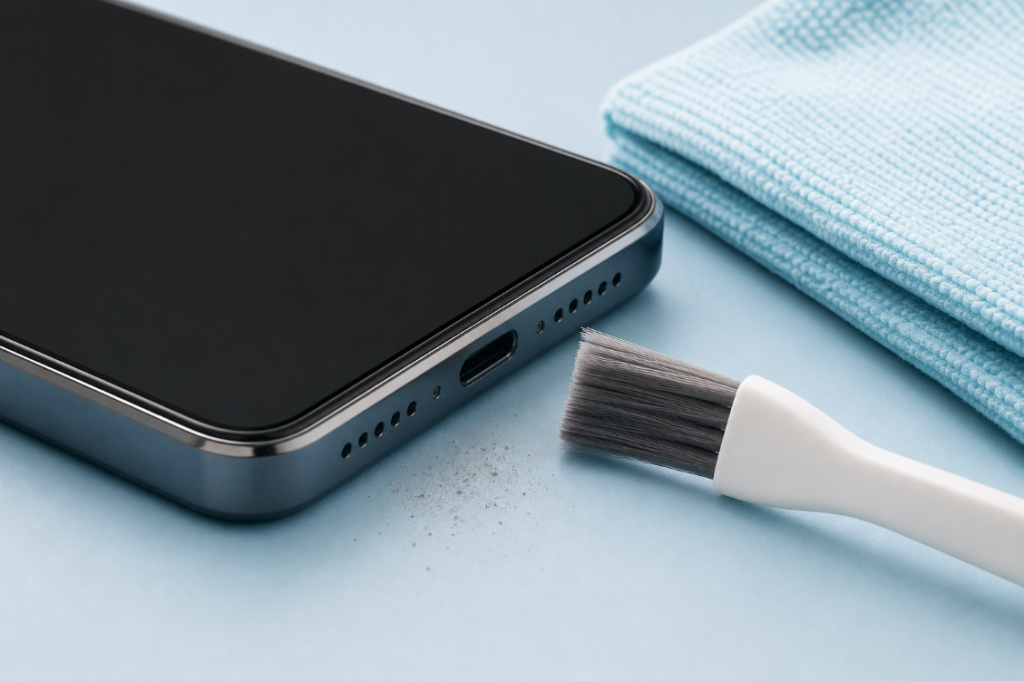
You can safely clean the outside of many phone speakers, but you should not push tools into the grille or pour cleaning liquid into an opening. A cleaning sound may help move a small droplet near the speaker mesh. It does not remove packed dust and cannot repair a failed speaker.
Quick Answer: How Do I Clean My Phone Speaker?
- Disconnect the charger and other accessories.
- Remove the case and inspect every speaker opening in bright light.
- Wipe the phone with a clean, soft, lint-free cloth.
- If your manufacturer allows it, brush only across the exterior grille with a clean, dry, very soft brush.
- Keep liquid, pins, toothpicks, adhesive putty, and compressed air away from the opening.
- Test spoken audio at a moderate volume.
- If the sound became muffled after a splash, follow a moisture-specific guide instead of treating the grille as dusty.
The goal is to lift loose material from the surface. Think of the speaker mesh like a fine window screen: gentle work across the surface is safer than forcing something through the holes.
First Identify the Type of Speaker Problem
Cleaning is useful only when debris is the likely cause.
| What you notice | More likely explanation | Best next step |
|---|---|---|
| Volume became quieter gradually over months | Dust, lint, case blockage, or normal wear | Remove the case, inspect the grille, and clean the exterior gently |
| Audio became muffled immediately after rain or a splash | Moisture close to the grille | Use the water in phone speaker guide |
| There is no sound at all | Audio routing, settings, software, or hardware failure | Test Bluetooth, volume, calls, media, and a restart before cleaning |
| Sound crackles at every volume | Debris, residue, or speaker damage | Stop high-volume tests and consider qualified service |
| Only one app sounds bad | App, recording, or streaming issue | Test another app and a locally stored recording |
| Sound plays through earbuds or a car | Bluetooth or cable routing | Disconnect the other audio device and test again |
If the speaker grille looks clean and the problem started suddenly without water exposure, repeatedly brushing it is unlikely to help.
Safe Exterior Cleaning Steps
1. Power Down or Disconnect Accessories
At minimum, unplug all cables and remove wired accessories. If the phone is behaving unexpectedly or you plan to work around its openings, turn it off first.
2. Remove the Case
A shifted case or poorly fitted screen protector can cover the earpiece or bottom speaker. Test the phone without the case before assuming the speaker itself is dirty.
3. Use Good Lighting
Look at the bottom speaker, top earpiece, and any secondary opening. Do not assume every row of holes is a speaker; some openings contain microphones. Your goal is inspection, not probing.
4. Wipe the Exterior
Use a soft, lint-free cloth. Follow the cleaning instructions for your exact phone model. Apple, for example, advises disconnecting cables, avoiding moisture in openings, and not using compressed air in its official product-cleaning guidance.
5. Brush Only the Surface if Permitted
If your phone manufacturer’s instructions permit a brush, use a clean, dry, very soft brush. Move it lightly across the exterior mesh. Do not push the bristles into the holes, and stop if the mesh moves, frays, or appears damaged.
6. Test With Spoken Audio
Spoken audio makes muffling and distortion easier to notice than loud music. Start at a low volume and raise it gradually. Compare the same recording before and after cleaning.
Can a Sound Clean Phone Speakers?
A sound does not clean dust in the same way that a brush lifts loose particles. The phone speaker produces sound by moving a thin diaphragm. A controlled low-frequency tone may move a small water droplet sitting near the speaker grille, which is why a water-eject tool sometimes improves audio after a light splash.
It cannot:
- dissolve sticky residue;
- pull lint through the mesh;
- dry the charging port;
- remove liquid from the battery or circuit board;
- repair a torn diaphragm or failed amplifier.
If moisture is the likely problem, open the Water Eject Sound tool only after disconnecting power and drying the outside of the phone. Hold the affected speaker downward, begin at a low volume, and use a short session. Stop if the speaker crackles sharply, the phone becomes warm, or the device behaves abnormally.
For the mechanics behind low-frequency playback, see the guide to frequencies used for wet speakers.
Cleaning Methods to Avoid
Do Not Insert Pins or Toothpicks
A sharp object can puncture mesh, damage a microphone, or push debris deeper. Even if a video calls this a quick DIY fix, the risk is greater than the likely benefit.
Do Not Pour Alcohol or Cleaner Into the Grille
A product that is safe on part of the exterior is not automatically safe inside an acoustic opening. Liquid can carry debris deeper or affect adhesives and seals.
Do Not Use High-Pressure Air
Compressed air can force particles and moisture farther into the phone. Manufacturer cleaning guidance should take priority over general internet advice.
Do Not Use Adhesive Putty Without Device-Specific Guidance
Putty can leave residue or become trapped in fine mesh. A method that appears to work on one grille design may damage another.
Do Not Run Maximum-Volume Tones for Long Periods
More volume is not the same as more cleaning. Distorted playback can stress the speaker without removing the cause of the problem.
How to Get Better Audio Quality After Cleaning
If the grille is clean but the sound is still poor, check these items:
- Audio routing: Turn off Bluetooth temporarily and disconnect USB-C or Lightning audio accessories.
- Case alignment: Confirm the case does not cover the bottom speaker or earpiece.
- Balance settings: Make sure left-right balance is centered and accessibility audio settings were not changed accidentally.
- App source: Compare calls, system alerts, a browser video, and locally stored audio.
- Equalizer settings: Disable extreme EQ or volume-boosting settings while testing.
- Restart and updates: Restart the phone, then install manufacturer-approved software updates when the battery and device are stable.
- Moisture: If the phone was recently wet, allow more drying time instead of repeating cleaning cycles.
A speaker cleaner cannot turn a small phone speaker into a larger one, and it cannot restore hardware that is physically damaged. The realistic goal is to remove an obstruction and restore the phone’s normal output.
When a DIY Fix Is Not Enough
Stop cleaning and seek qualified service when:
- the phone was submerged rather than lightly splashed;
- the liquid contained salt, sugar, soap, or chemicals;
- the speaker grille is torn, dented, or separating;
- the phone becomes hot, restarts, or shows display problems;
- there is no sound from calls, media, or system alerts after basic checks;
- crackling continues at low and moderate volume;
- the device has already been opened or repaired incorrectly.
Opening a modern phone can damage cables, seals, batteries, and water-resistance features. Unless you have the correct documentation, tools, parts, and battery-safety training, internal speaker replacement is not a low-risk DIY repair.
Frequently Asked Questions
What is the safest way to clean my phone speaker?
Disconnect accessories, remove the case, wipe the exterior with a soft lint-free cloth, and follow your phone manufacturer’s cleaning instructions. If permitted, use a clean, dry, very soft brush only across the outside of the grille.
Does a speaker-cleaning sound remove dust?
Not reliably. A tone may move a small water droplet close to the speaker opening, but dry dust and packed lint usually require safe exterior cleaning. Sticky residue may need professional attention.
Why is my phone speaker still quiet after cleaning?
The cause may be Bluetooth routing, a blocked case, audio balance, an app problem, moisture, residue, or hardware damage. Compare multiple audio sources before repeating the cleaning process.
Can cleaning improve audio quality?
Cleaning can restore normal sound when debris blocks the grille. It will not increase the speaker’s original capability or repair a damaged component.
Can I use the water-eject tool on Android?
The browser tool can play on many modern phones, but model designs and manufacturer instructions differ. Read the Android water-eject guide and treat sound as an optional step for minor speaker moisture.
Editorial Note
This article provides general phone-care information, not a guarantee of repair. Always follow the manufacturer instructions for your exact model, especially after liquid exposure or before cleaning an opening.