
Sound or vibration can sometimes move small water droplets near a phone speaker grille, but the two methods are not equally direct and neither one can dry the entire phone.
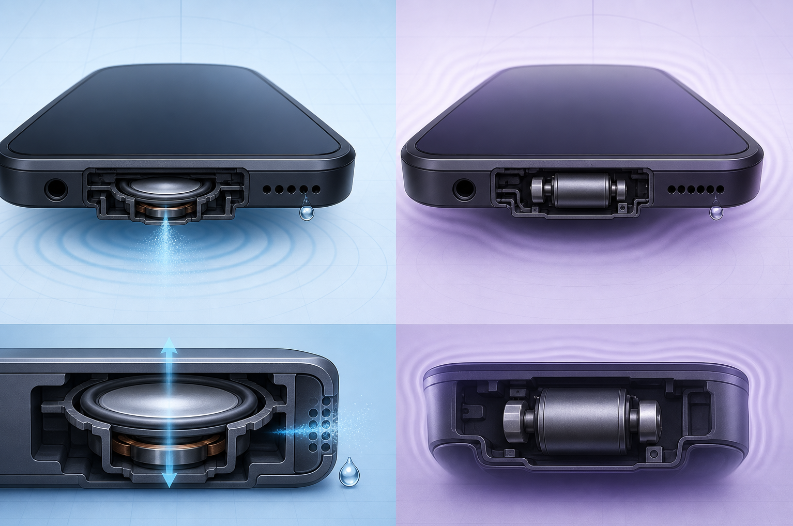
A speaker tone moves the speaker diaphragm—the same component next to the wet grille. The phone’s vibration motor shakes the device body more generally. For moisture limited to the speaker opening, controlled sound is usually the more relevant experiment. For liquid inside the charging port or electronics, neither method is a repair.
Speaker Sound and Phone Vibration Are Different
| Method | What moves | Where the movement is strongest | Main limitation |
|---|---|---|---|
| Speaker tone | Speaker diaphragm | At the speaker chamber and grille | Cannot reach or dry unrelated internal components |
| Vibration motor | Much of the phone body | Around the haptic motor and frame | Movement is less focused on the speaker grille |
| Gravity and airflow | Liquid and surrounding air | At downward-facing openings | Takes time and cannot remove sticky residue |
This is why a water-vibrate sound is better understood as speaker movement, not as the phone shaking all internal water out.
How Sound May Move a Droplet
A speaker converts an electrical signal into back-and-forth physical movement. At a low frequency, the diaphragm may move far enough to disturb a droplet close to the grille. Holding the speaker downward lets gravity work in the same direction.
Several variables affect the outcome:
- speaker size and enclosure design;
- grille shape and mesh;
- location and amount of moisture;
- phone case position;
- playback volume and distortion;
- whether the liquid left salt, sugar, soap, or other residue.
Because phones differ, there is no universal “water cleaner sound” guaranteed to work on every device.
Why the Vibration Motor Is Less Direct
The vibration motor is designed to create haptic feedback for notifications and typing. It shakes the frame, but it is not positioned to pump air through the speaker opening in the same way as the speaker diaphragm.
General vibration might help a loose surface droplet move, especially when the speaker faces downward. It may also move liquid somewhere less helpful. Violently shaking the phone is not recommended because it can spread moisture and offers no control over where it goes.
How to Use Audio Carefully
If the phone had only a light splash and is otherwise working normally:
- Disconnect cables and remove the case.
- Wipe the outside with a soft, lint-free cloth.
- Hold the affected speaker downward.
- Open the Water Eject tool.
- Start with the volume low.
- Play one short tone or sweep.
- Stop and test spoken audio at a low volume.
- Allow airflow and drying time before another attempt.
Do not press the speaker into a towel while playing the tone. Do not use maximum volume, and stop if the sound becomes severely distorted.
What Sound and Vibration Cannot Do
Neither method can reliably:
- dry a Lightning or USB-C connector;
- remove water from the battery, display, camera, or circuit board;
- remove salt, sugar, chlorine, soap, or sticky residue;
- reverse corrosion or an electrical short;
- repair a damaged speaker diaphragm;
- restore failed waterproof seals;
- guarantee that a phone is safe to charge.
Clear speaker audio also does not prove that every internal area is dry.
When Not to Use a Tone
Skip the tone and follow manufacturer or repair guidance if:
- the phone was submerged;
- it shows a liquid-detection warning in the charging port;
- it was exposed to salt water, pool water, soap, or a drink;
- it becomes hot, restarts, or will not turn on;
- the display, camera, buttons, or charging system also malfunction;
- the speaker makes a mechanical scraping or strong crackling sound.
Sound, Airflow, or Repair: Which One?
Choose a short sound attempt when
The phone had a minor splash, the problem is limited to muffled speaker audio, and the device is otherwise stable.
Choose airflow and patience when
The phone is externally wet, a connector needs time to dry, or the first sound attempt does not change anything.
Choose qualified repair when
The exposure was substantial, the liquid was contaminated, other components are affected, or symptoms remain after drying.
Frequently Asked Questions
What frequency clears water from a phone speaker?
There is no universal frequency supported for every phone. A low-frequency tone or sweep may move a surface droplet, but results depend on the speaker and the exposure.
Is vibration better than sound for water removal?
For a wet speaker grille, speaker sound acts more directly on the speaker diaphragm. General phone vibration is less focused and should not be treated as a method for removing internal liquid.
Can I make the phone vibrate continuously?
Continuous vibration is unlikely to solve a charging-port or internal moisture problem. Allow airflow and follow the manufacturer’s instructions instead.
Can sound remove all water from a phone?
No. It may help with a small amount near the speaker grille. It cannot confirm that the connector or internal electronics are dry.
Why did the sound improve without visible droplets coming out?
A droplet may have changed position, become thinner, or continued evaporating. Audio improvement alone does not show exactly where the moisture went.
Related Manufacturer Guidance
- Apple Support: About splash, water, and dust resistance of iPhone 7 and later
- Apple Support: If you see a liquid-detection alert on your iPhone
- Google Pixel Help: Help prevent water damage to your Pixel phone
Reviewed and substantially updated July 21, 2026. This article distinguishes movement of the speaker diaphragm from general phone vibration and does not claim that either method removes internal liquid.